.png)
About the University of North Dakota, School of Law
The University of North Dakota is a public university in Grand Forks, founded in 1883, and the largest institution in the North Dakota University System. Its School of Law is the only law school in North Dakota and has been a member of the Association of American Law Schools since 1910.
TBL in the School of Law
I am Carolyn Williams, an Assistant Professor of Law within the School of Law, and I’m going to share my experience on teaching using TBL.
I’ve been teaching legal research and writing courses, and each of my first-year legal writing courses has 15-17 students in a cohort of 100.
Across the first year curriculum, I run four fully TBL sessions and use Lexis Classroom (a version of Canvas) as the learning management system.
I first started with paper-based TBL in 2018–2020, using IF-AT scratch-off cards and paper tests. When COVID-19 happened, I shifted to using Moodle and Google Forms to run my readiness assurance tests (RATs).
Across these setups, three challenges stood out: (1) workflow friction from paper-based TBL, (2) limited visibility into reasoning gaps, and (3) limitations for team collaboration.
Challenge 1: Workflow friction from paper-based TBL
TBL works best when educators are empowered to focus on facilitation to optimize students’ learning, rather than logistics.
But with paper-based RATs, the mechanics are distracting and overwhelming for an educator. Furthermore, using multiple tools also increases instructor workload while creating a less consistent experience for students from session to session.
Each session required me to coordinate the paper answer key with the IF-AT scratch-off cards and to bring the correct set to class. I also had to collect them, ensure students wrote their names, and prevent any risk of lost materials.
Students also tallied and self-reported individual scores, creating opportunities for inaccurate reporting and making verification tedious. Storage added to the burden, since my school required records to be kept for at least two years.
With InteDashboard, RATs run digitally and consistently without paper collection, self-reported scoring, or stacks of physical records.
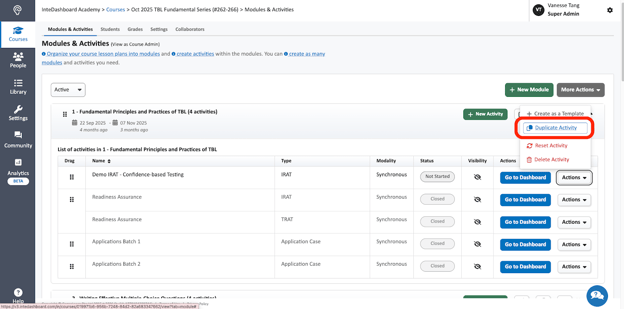
I can also reuse past setups by duplicating courses and activities rather than rebuilding RATs each term, freeing up more time and headspace to facilitate reasoning and debate.
Challenge 2: Limited visibility into reasoning gaps
RATs should surface misconceptions early, because accurate law application is foundational before students tackle more complex legal scenarios. Immediate feedback is especially important because it results in higher retention of knowledge.
With paper-based RATs, I couldn’t see student performance or the reasoning they used to arrive at the correct answer in real time. Even though I walked around the room during testing, it was hard to know what concepts needed clarification, because during an iRAT, students were silent, and during a tRAT I could only listen to one team’s conversation at a time. This results in delayed feedback and lower retention of knowledge.
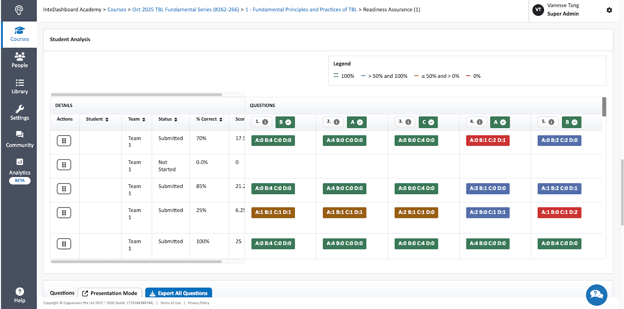
With InteDashboard, that visibility starts in the iRAT through Confidence-Based Testing. Students indicate their confidence for each answer, and I can view responses on the teacher dashboard in real time.
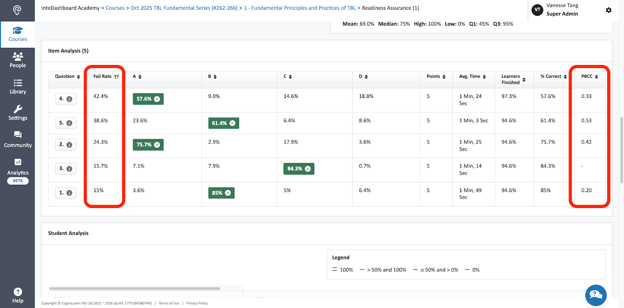
I can then use Item Analysis, which includes metrics like Fail Rate and the Point-Biserial Correlation Coefficient (PBCC), to evaluate how well each question is working.
Fail Rate shows the proportion of students who answered incorrectly, flagging items that may be too difficult or ambiguous (high fail rate) or too easy (low fail rate). PBCC measures how closely performance on a question aligns with overall test performance, showing whether an item actually distinguishes higher- and lower-performing students; if it doesn’t, I can revise the question or add clearer context.
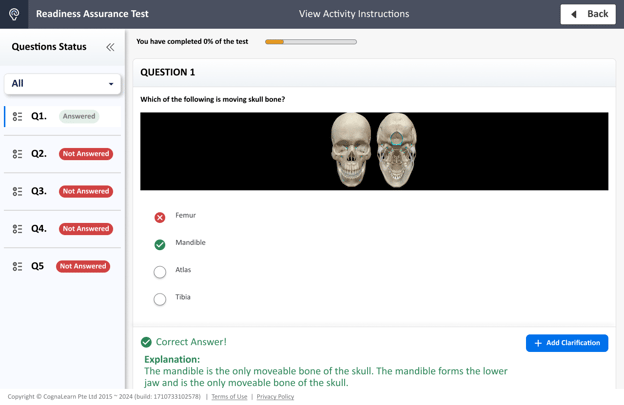
With immediate feedback, students can achieve a higher retention of knowledge and concepts. I can input explanations for each question that students review immediately upon answering correctly during the tRAT, which either reduces the need to explain each answer in depth or to reinforce it with repetition.
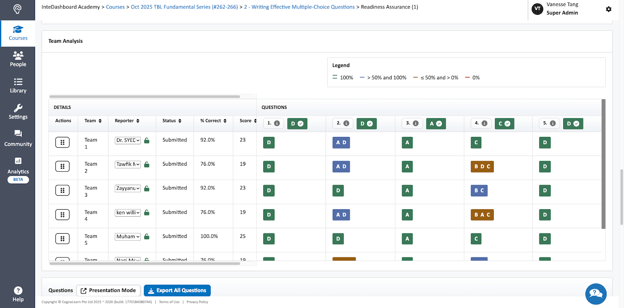
During the tRAT, immediate team-level analysis shows how teams are progressing, including the order in which they selected answer choices. Seeing teams’ sequence of answer options and noticing any cluster around wrong options also helps me to target the debrief on that specific misunderstanding.
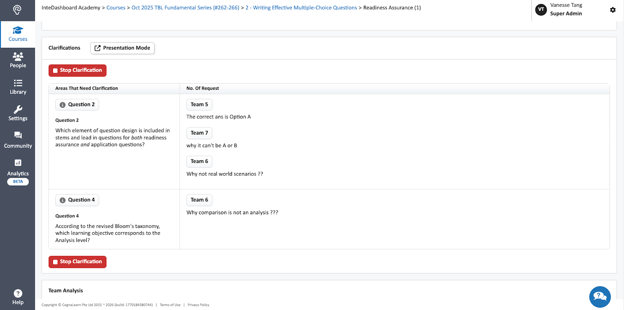
Students can also submit Clarification Requests during the tRAT, giving me a real-time list of what to address in the discussion. This helps me to hone comments immediately following the tRAT to the issues most students in the course are having with the material.
Challenge 3: LMS limitations for team collaboration and document-based work
Beyond visibility into reasoning gaps, I also needed a setup that supported team collaboration and document-based work, both of which are central to TBL in a law classroom.
When COVID-19 hit, I tried running my iRATs through DTL Brightspace, Blackboard, and Lexis Classroom, and my tRATs and application exercises (AEs) through Moodle and Google Forms. The platforms worked for delivering assessments, but weren't built for team collaboration.
I couldn’t configure the LMS setups to hide iRAT scores, even if students could not see which questions they had answered incorrectly. Students would compare their iRAT performance and become less willing to defend their answers during tRATs. They often deferred to the highest scorer instead of reasoning as a team, especially if the highest scorer earned a 100% on the iRAT.
There was no way to configure the LMSes to force the students to continue trying to find the right answer during the tRATs, so I had to use different platforms for the tRAT. Learning two different programs added to both the students’ and my mental load.
Running tRATs and AEs across Moodle and Google Forms also added operational friction, from remembering to circulate the right link to managing the risk of multiple submissions by various team members.
And in legal research and writing, where questions often depend on cases, memos, or motions, the tools didn’t support attaching documents directly to individual questions—limiting how complex application exercises could be.
However, InteDashboard brought me back to a TBL-first workflow. Individual iRAT scores can be hidden, so the tRAT becomes the place where teams discuss, commit to an answer, and learn through immediate feedback together. I can also include instructor explanations so teams know they arrived at the right answer because they understood the concept, not by chance. It was also easier to attach cases and statutes to individual questions in InteDashboard.
InteDashboard: An All-in-One TBL Platform for TBL experiences
When tools aren’t built for TBL, the workflow can distract from what matters most in law education: team discussion, timely clarification, and learning through reasoning. In Carolyn’s case, moving from paper-based processes and LMS workarounds to InteDashboard helped reduce workflow friction, surface reasoning gaps earlier, and keep learning focused on team collaboration. It has saved her 10-20 hours from creating courses from scratch and provided her more brain space in not having to manage paper-based TBL.
You can view Carolyn’s demo on how she runs TBL with InteDashboard in her law classes below. If you’d like a walkthrough of the platform for your own courses, book a demo with InteDashboard.