/InteDashboard_Logo_V3.png?width=166&height=42&name=InteDashboard_Logo_V3.png "InteDashboard")


In one of our previous blogs, we argued that AI use in higher education is already the norm, and that trying to ban or police it often misses the point. A more productive shift is from “don’t use AI” to “let’s use AI well and talk about it.”
At the same time, we don’t want students to simply apply prompt frameworks and call it a day. Even with AI in the workflow, students still need to practice higher-order thinking, including judgment, justification, and course-specific reasoning.
In this blog, we share practical ways to design AI-resilient application exercises (AEs) and assessments so that students are rewarded for critical thinking, not just polished outputs.
Why 4S Still Works in an AI World
Before adding anything new, it helps to notice that well-designed TBL AEs are already relatively AI-resilient because of the 4S structure: teams work on a Significant problem, solve the Same problem, make a Specific choice, and report Simultaneously.
A significant problem is authentic and constraint-rich, so teams must interpret context and justify trade-offs instead of repeating a generic response.
The same problem requirement makes reasoning comparable across teams, shifting attention from polished writing to the strength of arguments.
Specific choice forces commitment (A vs. B, rank-order, best option), making vague AI summaries insufficient and requiring teams to defend why alternatives are weaker in this scenario.
Finally, simultaneous reporting increases accountability by preventing teams from refining their response with AI after seeing others’ answers.
In short, if your AEs follow the 4S structure, you’re already off to a strong start.
Make AEs more AI-proof with Bloom’s Taxonomy
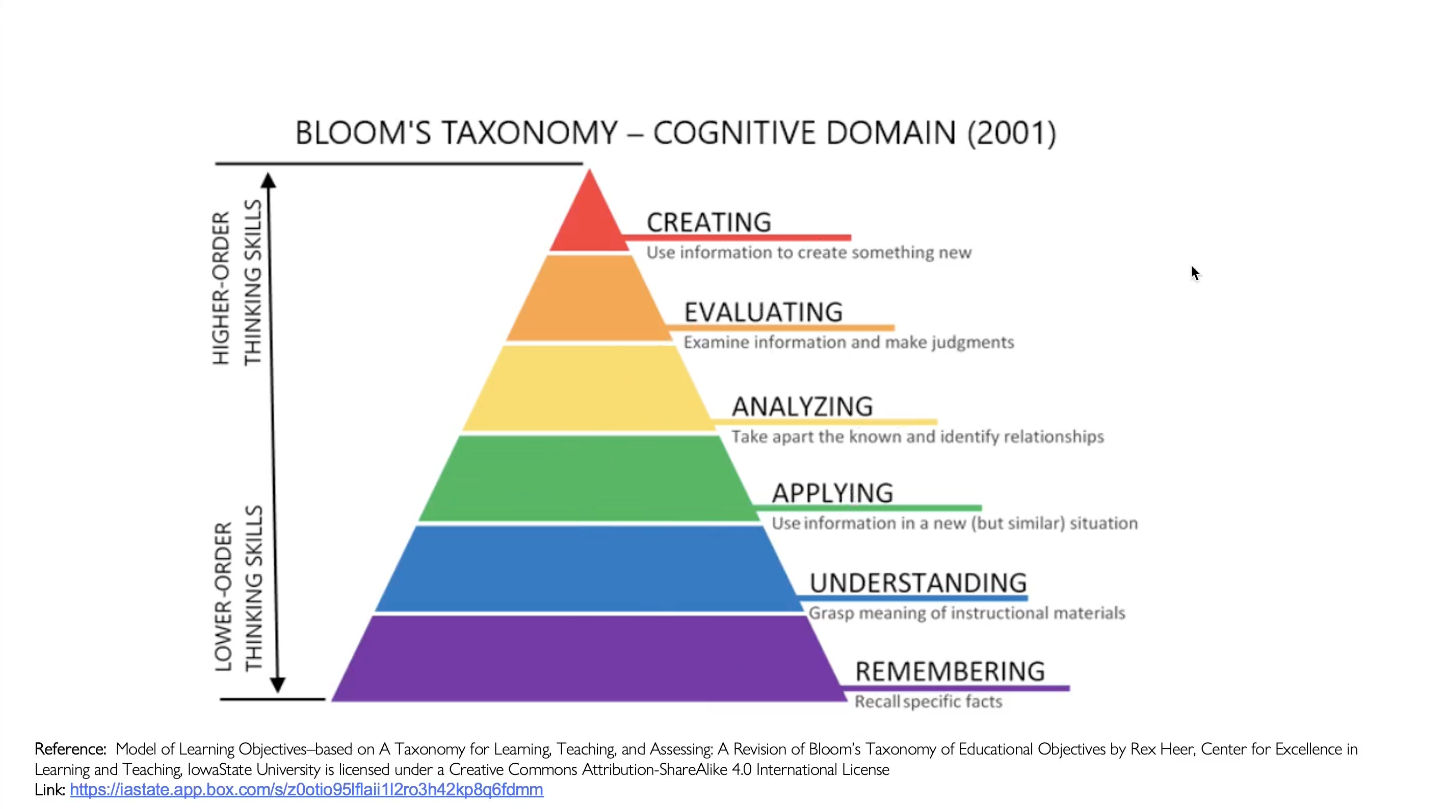
Bloom’s Taxonomy describes levels of thinking skills, from basic recall to more complex work like applying ideas, evaluating options, and creating solutions.
Because AI offers its biggest shortcut when assignments reward recall or polished summaries, this framework is useful for designing TBL AEs that push students into higher-order thinking: applying concepts, analyzing trade-offs, evaluating alternatives, and creating or adapting solutions.
Require teams to apply course concepts to the case
At the Apply level, students use a concept correctly in a specific situation, not just describe it.
To bring this to life in an AE, require teams to justify their specific choice using a named course concept or framework and two concrete case facts. During simultaneous reporting, ask teams to state them in one sentence before defending their decision.
This keeps the work anchored in course concepts and case evidence, so students still have to apply and justify rather than paste an AI response.
Make teams analyze and evaluate trade-offs and defend a decision
At the Analyze and Evaluate levels, students break down the case to identify what factors matter most and what assumptions are in play (analyze), then judge between options using evidence and clear criteria (evaluate).
To design for this in AEs, make response options plausible with real trade-offs, then require teams to choose the best option and explain why at least one alternative is weaker in this context.
You can also add an “assumption check” by asking teams to name the key assumption behind their choice and what would change their mind.
This shifts focus to criteria, trade-offs, and justification, so teams cannot rely on a plausible AI suggestion unless they can defend why it is best for this case.
Push teams to adapt or create under new constraints
At the Create level, students synthesize what they know to produce a solution, or adapt their decision when the situation changes.
To design for this in an AE, you could introduce a short twist after teams commit to an initial choice or plan, such as new data, a stakeholder priority shift, or a resource limitation. Then ask teams to design a revised recommendation that fits the new reality, and state what they changed, why it better fits the constraints, and what trade-off they accepted.
This rewards adaptive thinking and makes AI a support tool rather than a substitute for human judgment.
Final Tip: Make Reasoning Changes Visible (Not Just AI Use)
Even when AEs are designed for higher-order thinking, some teams will still use AI to brainstorm or draft. The difference is whether students can explain how their thinking evolved.
As a lightweight assessment add-on in TBL, you could build this into simultaneous reporting or the inter-team discussion that follows: if a team used AI, ask them to briefly share their reasoning process, including their initial choice, what AI suggested, what they kept or rejected, and what evidence from course materials ultimately justified their final decision.
This goes beyond an AI-use declaration. It rewards metacognition and makes the learning visible, even when AI is part of the workflow.
Designing for Critical Thinking in an AI World
Across this blog and our previous one on teaching with AI, the message is consistent.
First, we can build a culture of openness and guidance so AI use becomes discussable and coachable.
Second, well-designed 4S AEs aligned to higher-order thinking strengthen reasoning and justification in ways AI cannot replace. When you also ask students to reflect on how their thinking changed, you reinforce metacognitive skills like monitoring assumptions, evaluating evidence, and explaining why they revised their decision.
This is how TBL classrooms can keep critical thinking at the center even with AI in the workflow.
If you’d like to learn more about the same topic, you can access the recording of our workshop “AI-Crafted Application Exercises for Higher-Order Thinking in TBL” below.